Introduction
Primary and Backup SIP Servers
The SIP server redundancy mechanism ensures the reliability and continuity of SIP services. Primary/backup server deployment is one of these redundancy methods. The primary and backup servers share user accounts, Dialog information (depending on the server redundancy implementation), registration information, and other related data. Under normal conditions, all SIP requests and responses are handled by the primary server. When the primary server fails, is under maintenance, or becomes unreachable, the SIP terminal automatically switches to the backup server for service requests, ensuring continuous user access. Once the primary server recovers, the SIP terminal can automatically switch back to the primary server.
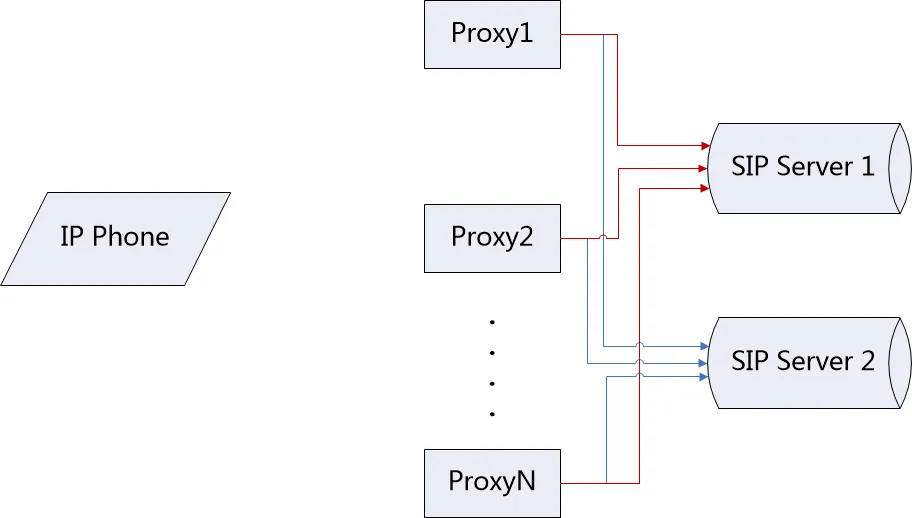
Figure 1 SIP Server Primary and Backup
Terminology
Failover: A mechanism in which the backup server takes over all services when the primary server is unavailable, without affecting the user experience.
Failback: A mechanism in which the device checks whether the primary server has recovered while the backup server is in service, so it can switch back to the primary server quickly.
Server Unavailable: When the client attempts to register, the server responds with 500/503, or UDP receives an ICMP target unreachable message, or the TCP connection times out.
Register Failback: When the primary server is unavailable and the phone registers to the backup server, the phone creates a new Register Dialog to detect whether the primary server has recovered. This function has an independent and configurable probing interval.
Target Audience
This document is intended for phone users and maintenance personnel.
Primary and Backup Servers
Function Settings
Configure two server entries for the SIP line on the phone. SIP Server1 is the primary server, and SIP Server2 is the backup server.
Failover
The phone currently supports Failover signaling for Register, Invite, and Bye. Other signaling methods are not supported at this time.
1. Register Failover
Trigger conditions: Manual registration / registration timeout / OPTIONS timeout / CANCEL request timeout
(1) The phone sends a Register request to the primary server;
(2) The phone attempts to send Register requests to the primary server for a specified number of times (V3 products) or within a specified period (V2 products);
(3) If the primary server is unavailable, the phone sends a Register request to the backup server;
(4) The backup server responds with 200 OK, and the phone registers successfully.
2. Invite Failover
Trigger condition: The user places a call
(1) Phone A calls Phone B;
(2) Phone A sends an Invite request to the primary server;
(3) Phone A attempts to send Invite requests to the primary server for a specified number of times (V3 products) or within a specified period (V2 products);
(4) If the primary server is unavailable, the phone sends a Register request to the backup server;
(5) The backup server responds with 200 OK, and the phone registers to the backup server successfully;
(6) The phone sends an Invite request to the backup server;
(7) The backup server responds with 200 OK, and a call is established between Phones A and B.
3. Bye Failover
Trigger condition: After a call is established through the primary server, the phone hangs up
(1) Phone A establishes a call with Phone B through the primary server;
(2) Phone A hangs up;
(3) Phone A sends a Bye request to the primary server;
(4) Phone A attempts to send Bye requests to the primary server for a specified number of times (V3 products) or within a specified period (V2 products);
(5) If the primary server is unavailable, the phone sends a Register request to the backup server;
(6) The backup server responds with 200 OK, and the phone registers to the backup server successfully;
(7) The phone sends a Bye message to the backup server;
(8) The backup server responds with 200 OK, and the call with Phone B is terminated.
4. Failover Failure
When all servers are unavailable, the phone attempts each server in order of primary/backup priority for a specified number of times (V3 products) or within a specified period (V2 products). The last server is treated as an exception. According to RFC 3261, SIP will retry for 64*T1 (32 seconds). If the current SIP signaling request still fails, the failure is reported to the user.
Failback
The phone supports independent Register Failback. After the phone registers successfully to the backup server, it periodically sends an independent Register request to the primary server to detect whether the primary server has recovered.
Trigger condition: Register Failback timer timeout.
(1) The phone registers successfully to the backup server;
(2) When Register Failback times out, the phone sends an independent Register request to the primary server;
(3) If the primary server responds with 200 OK, the phone switches back to the primary server;
(4) If the primary server is still unavailable, the Register request is retransmitted according to RFC 3261 until 64*T1 (32 seconds) times out. After the timeout, the timer starts again and continues probing the primary server periodically.
SIP Server Primary/Backup Configuration
Configuration Item Description
|
Configuration Item |
Description |
Value |
|
SIPN Register Addr: |
Primary server address. | IP / Domain nameDefault: Empty |
|
SIPN Register Port: |
Primary server port. | NumericDefault: 5060 |
|
SIPN Register TTL: |
Primary server registration interval. | NumericDefault: 3600 seconds |
|
SIPN Transport: |
Primary server transport protocol: UDP, TCP, or TLS. | 0: UDP
1: TCP
3: TLS
Default: 0 |
|
SIPN Backup Addr: |
Backup server address. | IP / Domain name Default: Empty |
|
SIPN Backup Port: |
Backup server port. | Numeric Default: 5060 |
|
SIPN Backup TTL: |
Backup server registration interval. | Numeric Default: 3600 seconds |
|
SIPN Backup Transport: |
Backup server transport protocol: UDP, TCP, or TLS. | 0: UDP
1: TCP
3: TLS
Default: 0 |
|
SIPN Enable Failback: |
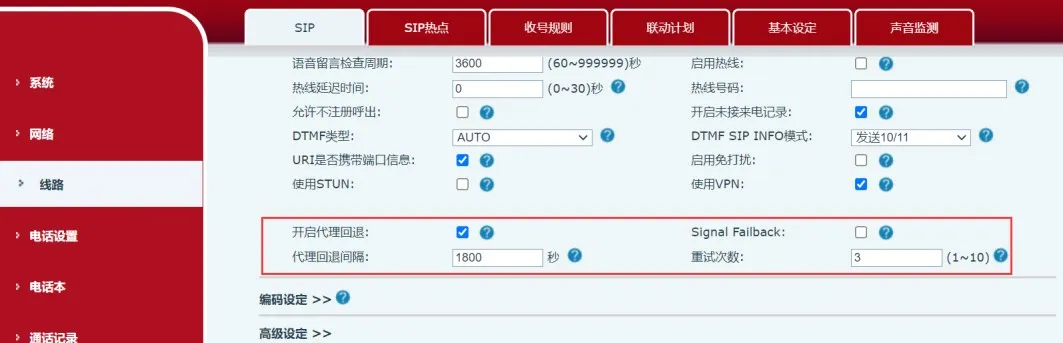
Controls whether Register Failback is enabled for the line. | 0 / 1 Default: 1 |
|
SIPN Failback Interval: |
The interval for probing whether the primary server/proxy has recovered after the phone has registered to the backup server/proxy. | Numeric Default: 1800 seconds |
|
SIPN Signal Retry Counts: |
The number of SIP request retransmissions when the server/proxy is unavailable, except for the last server/proxy (32-second timeout). | Numeric Default: 3 |
User Configuration Interface
Users can log in to the phone's web server to configure the primary and backup servers.
(1) Click the “Line” tab and select the SIP sub-tab (this is the default page);
(2) Select the line to be configured from the “Line” drop-down list within the page;
(3) Configure the line registration information;
(4) Configure the SIP Server1 (primary server) and SIP Server2 (backup server) information, as shown in Figure 2;
(5) Click “Basic Settings” on the current page to configure the Failback-related settings for the primary and backup servers, as shown in Figure 3;
(6) Click the “Submit” button at the bottom of the page to apply the configuration.
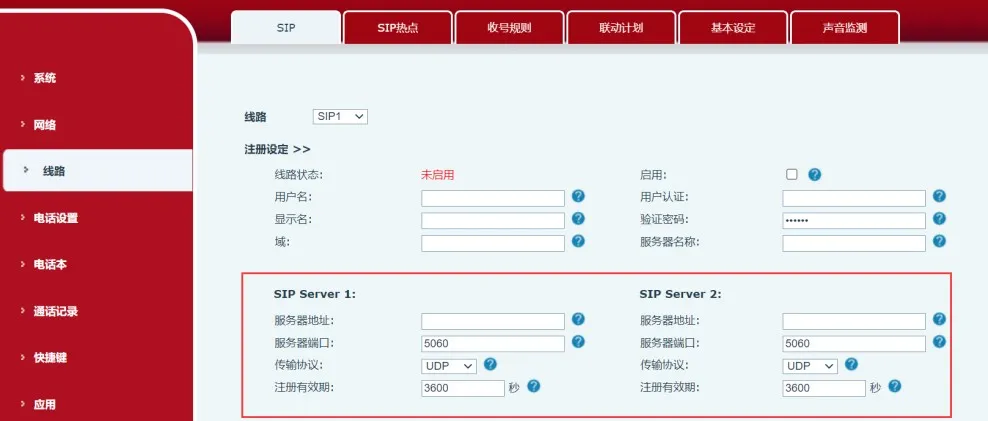
Figure 2 SIP Server Primary/Backup Configuration