Introduction
Overview
This guide is intended for users who have configured SIP account settings on the phone, submitted the registration request, and then encountered a registration failure.
Applicable Models
Supported products: all phone models.
Supported firmware: all firmware versions for the supported models.
Intended Users
This document is designed for users who need to troubleshoot SIP account registration failures.
Solutions
Choose the Problem Type
Scenario 1: Registration times out immediately after the account settings are submitted.
Scenario 2: Registration times out after the phone has been working normally for some time.
Scenario 3: Registration fails and an error code is returned.
Scenario 4: After running normally for a period of time, the phone suddenly drops registration and loses network connectivity. After the phone is restarted, the network connection returns.
Scenario 5: The phone shows as registered, but the PBX reports the extension as offline or unregistered.
Troubleshooting and Corrective Actions
Registration times out immediately after the account settings are submitted
1. Symptom:
After the SIP account parameters are entered and submitted, the phone displays Registering..., and after a short period the status changes to Registration Timeout.
2. Possible Causes:
The phone sends a SIP registration request but never receives a response from the server, which results in a timeout.
① There may be a network connectivity issue between the phone and the server, or the SIP settings may be incorrect, such as an incorrect server address or port.
② The account may have been temporarily blacklisted by the system. In some IMS environments, if the same account registers too frequently, the system may treat it as suspicious behavior and block registration for a period of time, for example 10 minutes.
③ When the phone is on a private LAN and registers to a public SIP server, the server response may not be able to reach the phone correctly.
3. Solutions:
① Confirm that the phone and server can communicate properly, for example by Ping, and verify that all SIP parameters are correct, especially the server address and port.
② Wait for a while before submitting the registration again, or create a new account on the server. Avoid registering the same account repeatedly on different phones.
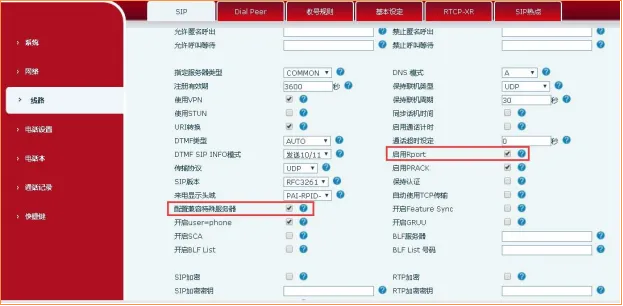
③ If an internal phone is registering to a public SIP server, enable rport and Special Server Compatibility, then try registering again.
Registration times out after the phone has been working normally for some time
1. Symptom:
The phone registers successfully and works normally, but after some time, usually about one day, the registration status changes to Registration Timeout. The phone can no longer place or receive calls. Restarting the phone or changing the local SIP port allows registration to succeed again.
2. Possible Causes:
This issue often occurs in environments using certain routers. When the router is rebooted or receives a new public IP address, packets sent by the phone may still be translated using the router’s previous public IP. As a result, the server response cannot return to the phone, causing a registration timeout.
When the phone is restarted or the local registration port is changed, the router rewrites the source address correctly and registration works again.
3. Solution:
Newer firmware versions support a dynamic local SIP port mechanism. When registration fails or times out, the phone will attempt the next registration using a new local port. Download the latest firmware from the official website or contact technical support to confirm version support.
Registration fails and an error code is returned
1. Symptom:
After the SIP account information is configured and submitted, the phone shows a registration failure message.
① Error code 403
② Error code 404
③ Error code 423
④ Error code 5xx
2. Possible Causes:
① Usually indicates an incorrect username or password, or that the account has been disabled on the server.
② Indicates that the account does not exist.
③ Indicates that the registration interval is too short.
④ Indicates a server-side fault.
3. Solutions:
① Recheck the username and password, and confirm the account status with the administrator.
② Ask the administrator to verify that the account exists.
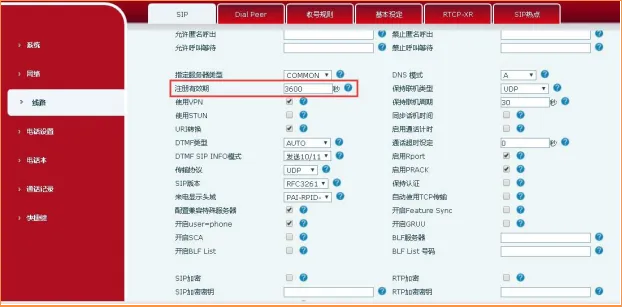
③ Increase the registration expiry interval on the phone.
④ Contact the administrator to check the SIP server status.
The phone suddenly drops registration and loses network connectivity after running normally for some time
1. Symptom:
After the phone has been operating normally for a period of time, it suddenly loses registration and network connectivity. Restarting the phone restores the network connection.
2. Possible Causes:
Some Cisco switches and certain Layer 2 switches use ARP aging timers that differ from the ARP aging logic used by the phone. If the switch-side ARP entry expires earlier than expected, the phone network connection may be interrupted.
3. Solution:
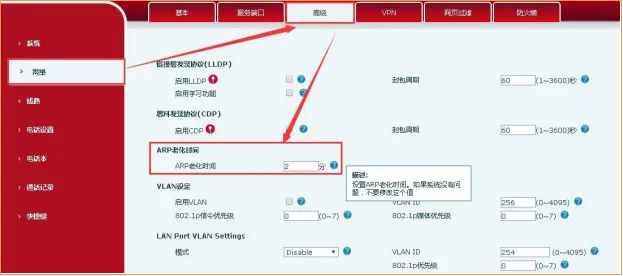
Upgrade the phone to the latest firmware version. Newer firmware supports manual configuration of the ARP aging timer. In the phone web interface, go to Network - Advanced - ARP Aging Time, then set the value from 1 to N minutes as needed.
The phone shows as registered, but the PBX reports the extension as offline or unregistered
1. Symptom:
The phone display indicates that the account is registered, but the PBX shows the extension as offline or not registered.
2. Possible Causes:
In some networks, IP routing or NAT may remain active, but NAT keep-alive is not enabled on either the PBX or the phone. After the SIP registration response is completed, there is no ongoing UDP keep-alive traffic, so the NAT device removes the mapping after the default UDP timeout, which is often 60 seconds.
3. Solution:
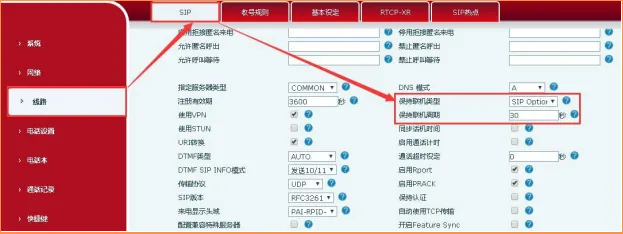
Log in to the phone WEB Interface --- Line --- Advanced Settings, then adjust the keep-alive type and keep-alive interval according to the SIP server requirements. You can also try SIP OPTION or UDP. The keep-alive interval should be set to less than 60 seconds.
The following examples use the X4U phone as the reference model for configuration.
How to enable rport and Special Server Compatibility
Go to the phone web management page and click Line - Advanced Settings, then check Enable Rport and Configure Special Server Compatibility, then click Submit at the bottom of the page, as shown below:
How to enable local Port Update
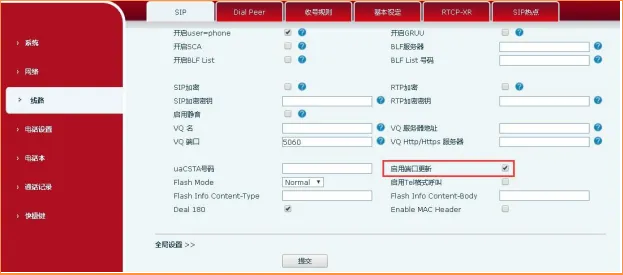
Go to the phone web management page and click Line - Advanced Settings, then check Enable Port Update, then click Submit at the bottom of the page, as shown below:
How to change the Registration Expiry setting
Go to the phone web management page and click Line - Advanced Settings - Registration Expiry, change the registration interval, then click Submit at the bottom of the page, as shown below:
How to change the ARP Aging Time
Go to the phone web management page and click Network - Advanced - ARP Aging Time, set the value from 1 to N as needed, preferably matching the switch aging timer, then click Submit at the bottom of the page, as shown below:
How to change the Keep-Alive Type
Go to the phone web management page and click Line - Advanced Settings - Keep-Alive Type. Select the mode supported by the SIP server, or try SIP OPTION or UDP, then click Submit at the bottom of the page, as shown below: