SLAAC is one of the core mechanisms that makes IPv6 different from older address assignment models. The term stands for Stateless Address Autoconfiguration, and it refers to the process by which an IPv6 host can automatically configure its own address and basic network parameters without needing a traditional stateful address server to assign every address individually. In practical terms, this allows an IPv6-capable device to join a network, learn the relevant prefix information, create its own address, verify that the address is unique on the local link, and begin communicating with the wider IPv6 network.
This is one of the reasons SLAAC is so important in IPv6 design. It reduces dependence on manual address configuration and allows hosts to self-configure in a standardized way. The formal behavior is defined in RFC 4862, which specifies the steps hosts take in deciding how to autoconfigure IPv6 interfaces, including generating a link-local address, generating global addresses through stateless autoconfiguration, and performing Duplicate Address Detection. Router Advertisement behavior comes from IPv6 Neighbor Discovery, defined in RFC 4861, which is the mechanism hosts use to discover routers, prefixes, and other network information on the local link.
In modern IPv6 networks, SLAAC is widely used in enterprise, campus, broadband, mobile, home, lab, and cloud-adjacent environments. It is often discussed alongside DHCPv6, Router Advertisements, Neighbor Discovery, privacy extensions, stable interface identifiers, and DNS configuration. To understand IPv6 clearly, it is essential to understand what SLAAC is, what it configures automatically, how it works step by step, and where its strengths and limits matter in real deployments.
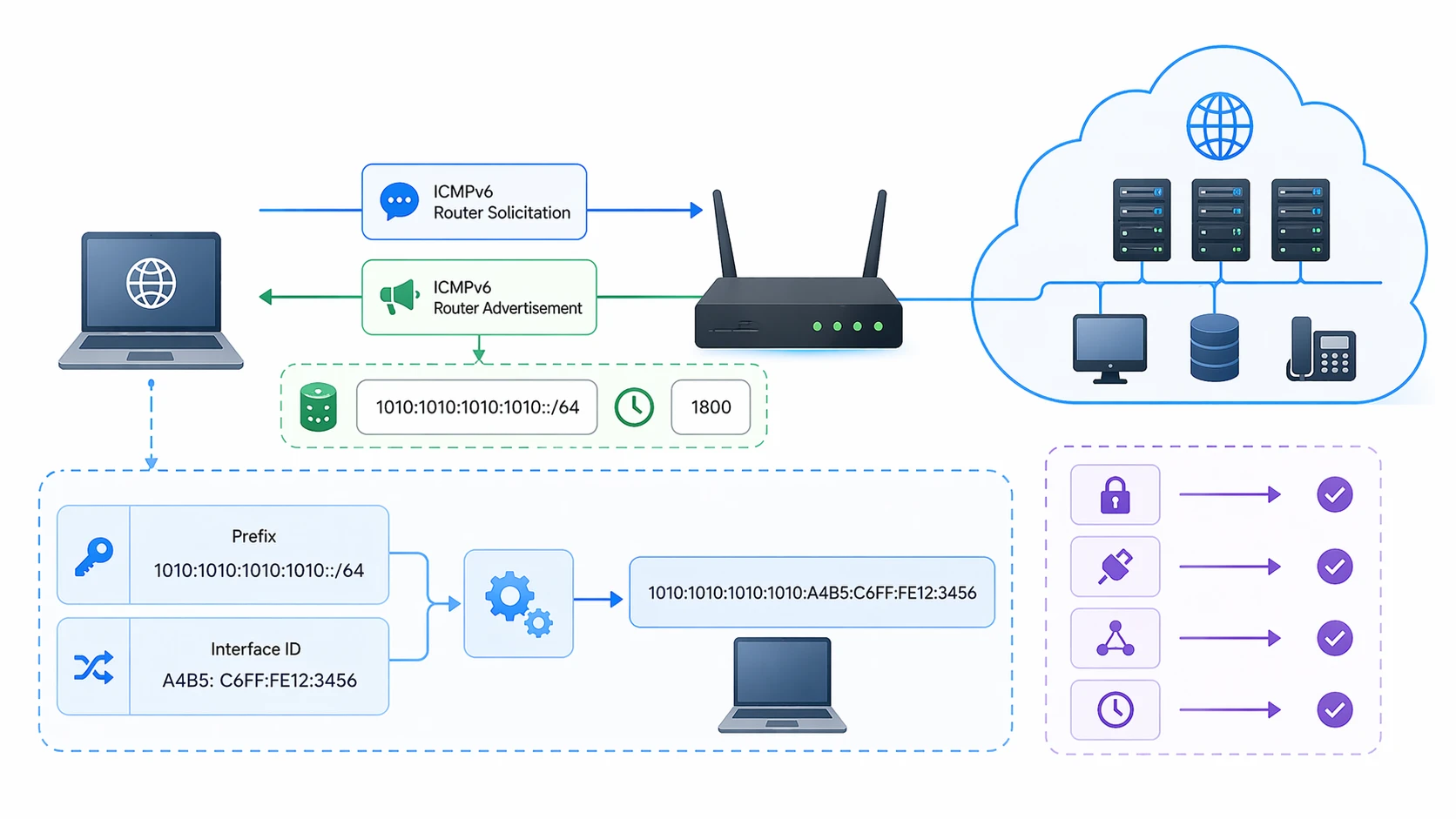
SLAAC allows IPv6 hosts to build their own addresses from network advertisements instead of waiting for a server to assign one directly.
What Is SLAAC?
Basic definition
SLAAC stands for Stateless Address Autoconfiguration. In IPv6, it is the process by which a host configures addresses for an interface using information advertised on the local network rather than relying only on a stateful server to assign the address. RFC 4862 defines this as the mechanism that enables a host to generate a link-local address, generate global addresses through stateless autoconfiguration, and perform Duplicate Address Detection to verify uniqueness on the link.
The word “stateless” is important. It means the router advertising the prefix does not need to keep per-host address assignment state in the same way a traditional stateful server would. The host uses the prefix information it learns from the network and combines that with its own interface identifier logic to create a usable IPv6 address.
Why IPv6 uses this approach
IPv6 was designed to support simpler and more scalable address configuration than the manual or tightly server-dependent approaches that had often been used in earlier environments. By allowing a host to construct its own address after receiving network information from Router Advertisements, the protocol reduces operational friction and supports easier onboarding of devices. RFC 4862 explicitly frames the process as host-side autoconfiguration, while RFC 4861 provides the Neighbor Discovery and Router Advertisement behavior that makes it possible.
This does not mean IPv6 eliminates all role for central configuration systems. In practice, SLAAC often coexists with DHCPv6, local policy controls, RA-based DNS information, and network access rules. But the autoconfiguration capability remains one of the defining characteristics of IPv6 host behavior.
SLAAC means the host configures its own IPv6 address from information learned on the local link, rather than waiting for a server to hand out every address one by one.
How SLAAC Works
Step 1: The host creates a link-local address
Before it can communicate meaningfully on the local IPv6 link, a host must have a link-local address. RFC 4862 describes generation of a link-local address as part of the autoconfiguration process itself. This address is used for communication on the local link and is fundamental to Neighbor Discovery and Router Advertisement processing.
This step matters because the host needs a local IPv6 identity before it can fully participate in discovery procedures with nearby routers and neighbors. Even before any global unicast prefix is learned, the link-local address makes local IPv6 interaction possible.
Step 2: The host learns network information from Router Advertisements
After establishing local presence, the host listens for Router Advertisements or may solicit them from local routers. RFC 4861 defines Router Advertisements as part of IPv6 Neighbor Discovery and explains that hosts use Neighbor Discovery to discover routers, prefixes, and other parameters needed on the local link.
These advertisements tell the host whether a prefix is available for autonomous address configuration, whether a router should be treated as a default gateway, and whether other configuration methods such as DHCPv6 are also indicated. This is one of the most important distinctions in IPv6: the router is not only forwarding traffic, it is also telling hosts how to configure themselves.
Step 3: The host forms a global or unique local address
Once the host learns a usable prefix that is marked for autonomous configuration, it combines that prefix with an interface identifier to build its address. This host-side address construction is the core of SLAAC. RFC 4862 specifies that global addresses can be generated through stateless autoconfiguration, while RFC 7217 later describes one method for generating semantically opaque interface identifiers that remain stable within a subnet but change across different networks.
Historically, interface identifiers were sometimes derived directly from link-layer addresses, but that raised privacy concerns. Later recommendations favored more privacy-aware and semantically opaque approaches, and RFC 8064 recommends using the RFC 7217 mechanism as the default way to generate stable SLAAC interface identifiers rather than embedding stable link-layer addresses directly.
Step 4: Duplicate Address Detection checks uniqueness
After the address is formed, the host must verify that it is not already in use on the link. This is done through Duplicate Address Detection, or DAD, which RFC 4862 identifies as a required part of the autoconfiguration process. DAD is essential because even if an address is generated locally, it still has to be unique on the local network segment before it is safe to use.
If DAD succeeds, the host can treat the address as valid and use it according to its preferred and valid lifetimes. If DAD fails, the address cannot safely be used, and corrective behavior depends on the specific address-generation method and host implementation.
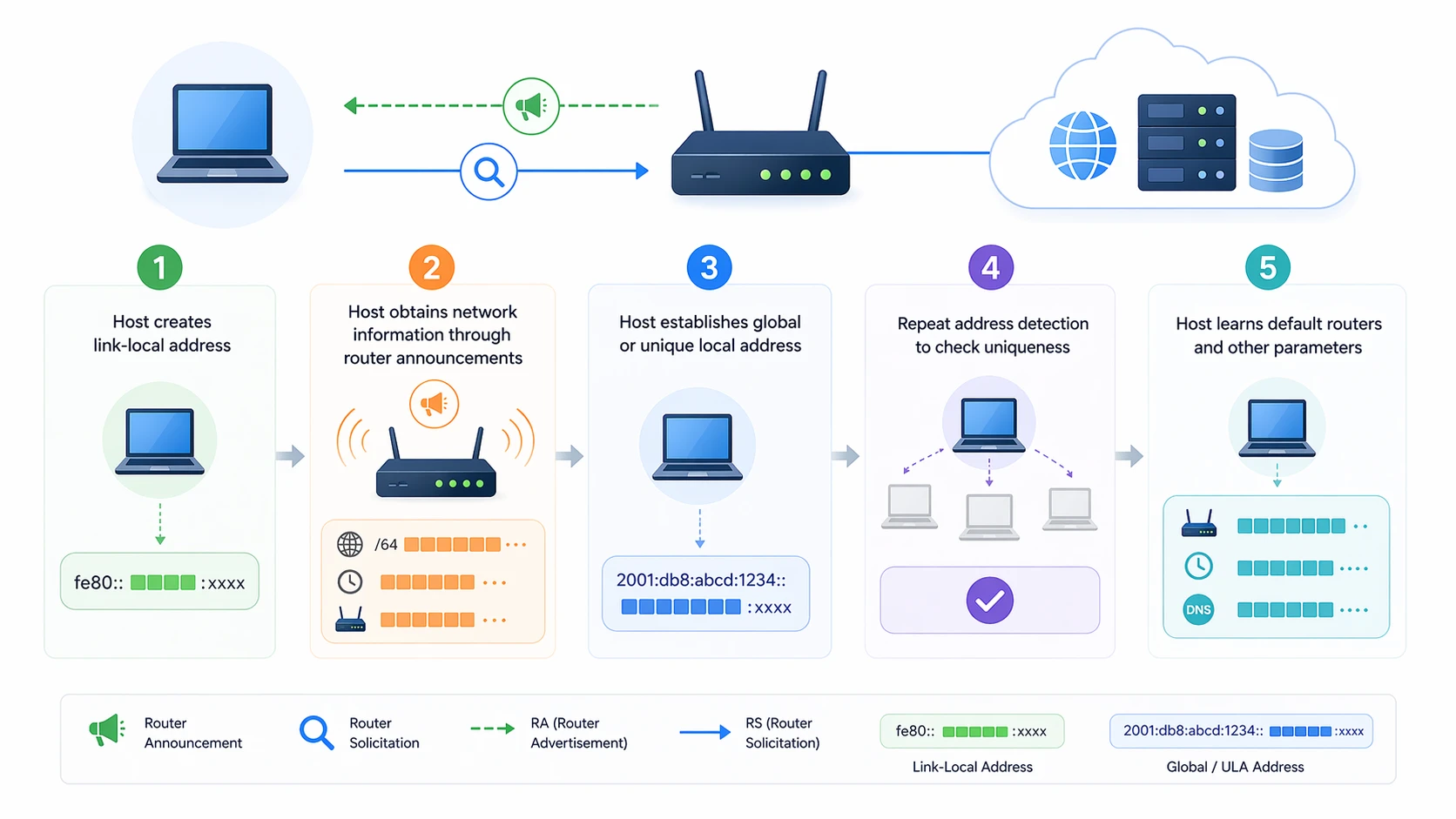
SLAAC involves local address creation, router advertisement learning, host-side address formation, and uniqueness checks through DAD.
Step 5: The host learns the default router and other parameters
SLAAC is not only about the address itself. Router Advertisements also provide default-router information and can indicate additional network behavior. RFC 4861 explains that Neighbor Discovery is used by hosts to find routers and maintain reachability information about paths to active neighbors. That means the host does not only build an address through SLAAC; it also learns how to reach the wider network through the advertising router.
This is one reason Router Advertisements are central to IPv6 host behavior. They are the mechanism by which the host learns both how to number itself and where to send traffic beyond the local link.
Key Components Behind SLAAC
Router Advertisements
Router Advertisements, or RAs, are the core control messages that tell hosts about prefixes, default routers, and configuration hints. Without RAs, SLAAC cannot provide the host with the prefix information required for autonomous global address configuration. RFC 4861 makes Router Advertisements a central part of Neighbor Discovery.
In practical deployments, understanding RA behavior is often more important than memorizing the word SLAAC itself. The host does not magically invent the network prefix. It learns the prefix from a router that advertises the information on the local link.
Prefix information
The advertised prefix is one of the most important parts of the process. It is what tells the host which IPv6 network it belongs to and what portion of the address space it can use when building its own address. If the router marks the prefix for autonomous configuration, the host is allowed to use that prefix in SLAAC. RFC 4862 defines how the host uses such prefix information in stateless autoconfiguration.
This is why SLAAC is often explained as the host combining a prefix learned from the network with a locally generated interface identifier.
Interface Identifier generation
The interface identifier, or IID, is the host-generated part of the address that gets combined with the prefix. IID generation has evolved over time because privacy and tracking concerns became more important in IPv6 deployments. RFC 7217 defines a method for generating semantically opaque IIDs that are stable within a given subnet but differ across networks, and RFC 8064 recommends that approach as the default recommendation for stable SLAAC addresses.
This matters because not all SLAAC-generated addresses look the same or carry the same privacy implications. The address-generation method has a direct impact on traceability, stability, and operational behavior.
Duplicate Address Detection
DAD is the quality-control stage of SLAAC. It checks whether the newly formed address is already in use on the local link. RFC 4862 explicitly includes DAD as part of the standard autoconfiguration process. Later work such as RFC 9131 also updates Neighbor Discovery behavior around new address assignment and unsolicited Neighbor Advertisements, reflecting the continuing operational importance of correct address uniqueness handling.
This reinforces a simple but important idea: address generation is not enough on its own. Address verification matters too.
SLAAC depends on three essentials working together: routers advertise the prefix, the host generates the address, and DAD verifies that the address is safe to use.
SLAAC and DNS Configuration
What SLAAC does not automatically guarantee
People often speak about SLAAC as if it solves all host configuration by itself. In reality, basic SLAAC is specifically about address autoconfiguration and related local IPv6 behavior. DNS information is a separate issue. Historically, one of the common questions in IPv6 deployment has been how hosts learn DNS recursive server addresses and search lists when using SLAAC.
This is why DNS configuration in IPv6 is often discussed separately from core SLAAC behavior. The host may be able to configure its address through SLAAC and still need another method to learn DNS settings unless Router Advertisement options for DNS are present or another service such as DHCPv6 is used.
Router Advertisement options for DNS
RFC 8106 addresses this directly by specifying Router Advertisement options that allow IPv6 routers to advertise a list of DNS recursive server addresses and a DNS Search List to IPv6 hosts. This means that in many deployments, DNS information can be distributed through RA options without requiring DHCPv6 solely for DNS. RFC 8106 obsoletes RFC 6106 and remains the relevant standards-track reference for RA-based DNS configuration.
This is an important operational point because many administrators think of SLAAC and DHCPv6 as the only two choices. In practice, SLAAC with RA-based DNS options is a common and perfectly valid deployment model.
SLAAC vs DHCPv6
SLAAC and DHCPv6 are often discussed together, but they are not the same thing. SLAAC is host-side stateless address configuration based on Router Advertisements. DHCPv6 is a separate framework for obtaining configuration through a DHCPv6 server. In IPv6 networks, the two methods can coexist rather than compete in a simple either-or model. The router can indicate through RA flags whether hosts should use additional stateful or stateless DHCPv6 behavior while still using SLAAC for the address itself. RFC 4861 and RFC 5175 both relate to Router Advertisement flag behavior and the signaling framework around those decisions.
| Item | SLAAC | DHCPv6 |
|---|
| Address source | Host builds its own address from RA-learned prefix | Server can assign or provide configuration |
| Configuration state | Stateless on the router side for address creation | Stateful or supplementary depending on deployment |
| Dependency on Router Advertisements | Core requirement for prefix information and router discovery | Often coordinated with RA flags and router behavior |
| Typical use | Simple and scalable host autoconfiguration | Additional control, policy, or supplementary configuration |
In real deployments, the choice is often not “SLAAC or DHCPv6” but rather “what role should each play in this network.” Many IPv6 environments use SLAAC for addresses and RA-based DNS, while others combine SLAAC with DHCPv6 for other administrative goals.
Benefits of SLAAC
Simpler host onboarding
One major benefit of SLAAC is that hosts can configure themselves automatically once they are on the link and receive Router Advertisements. RFC 4862 describes this host-side autoconfiguration flow directly. This reduces the need for manual addressing and can simplify large-scale endpoint onboarding.
For administrators, this can make IPv6 deployment smoother, especially in environments with many client devices or changing populations of endpoints.
Reduced operational dependency on stateful address assignment
Another benefit is that the router does not need to track and hand out every address individually in the way a classic stateful assignment model would. The host creates the address for itself after learning the prefix and policy hints from the local router. This reduces operational coupling between address creation and central lease state.
That stateless characteristic is one of the key architectural ideas behind IPv6 autoconfiguration.
Strong fit for IPv6 design philosophy
SLAAC also fits the broader philosophy of IPv6, which emphasizes scalable host self-configuration, router-assisted discovery, and flexible coexistence with other configuration methods. Neighbor Discovery and Router Advertisement behavior are central to this model, making SLAAC feel native to IPv6 rather than bolted onto it. RFC 4861 and RFC 4862 together define that combined behavior.
This is why SLAAC is often one of the first concepts taught when explaining how IPv6 differs from older address assignment approaches.
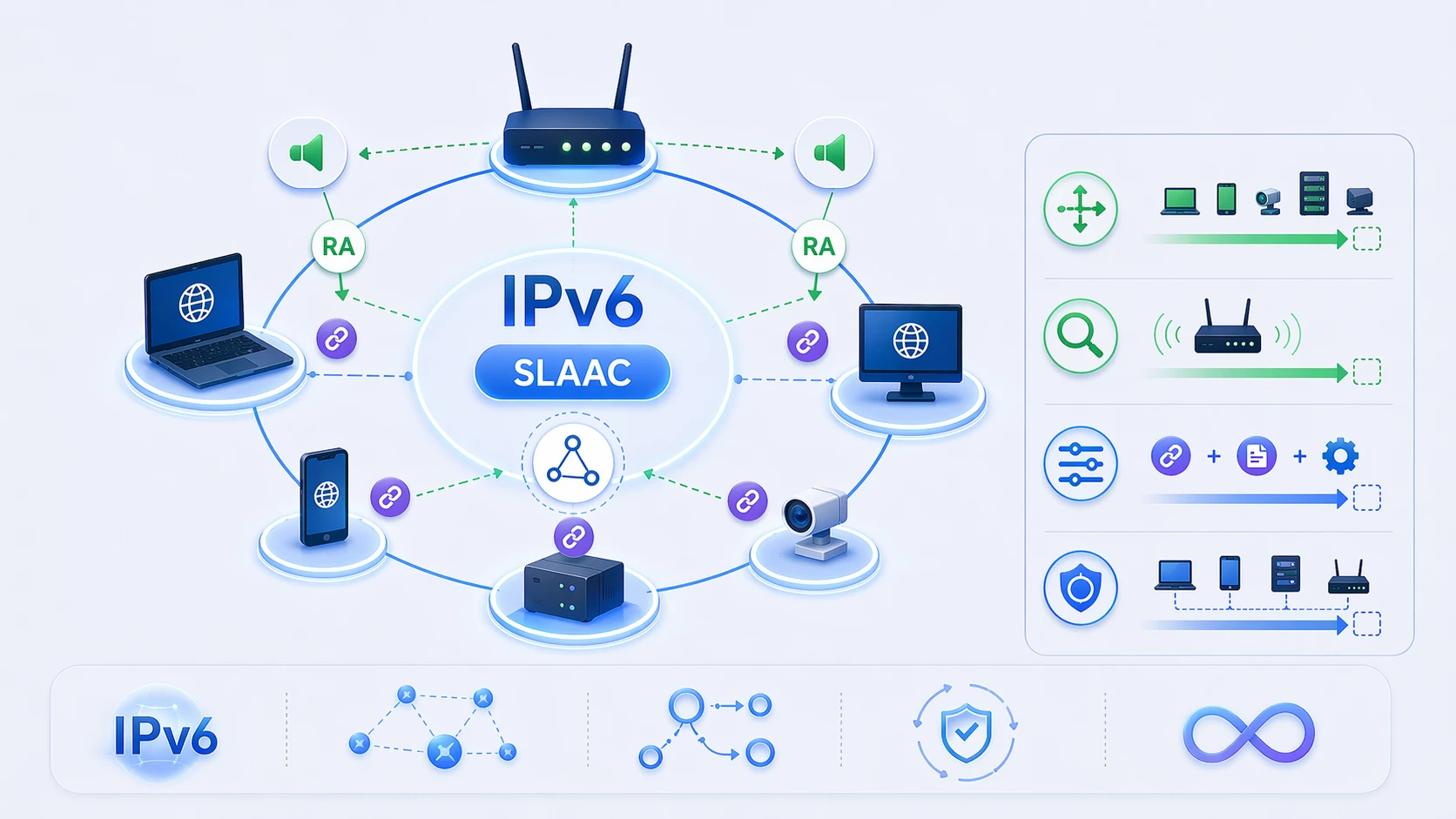
SLAAC reduces manual configuration and lets IPv6 hosts build addresses automatically using network-advertised information.
Limitations and Considerations
DNS handling is separate from core address creation
One limitation is that core SLAAC does not automatically solve every configuration need by itself. DNS distribution requires either RA-based DNS options or some other supplementary method. RFC 8106 addresses this gap for RA-based DNS advertisement, but administrators still need to design this intentionally rather than assume it happens automatically.
This is one of the most common sources of confusion when teams first deploy IPv6 with SLAAC.
Privacy and IID generation choices matter
Another important consideration is privacy. Older IID construction methods could embed stable hardware-related values in addresses, which created tracking concerns. RFC 7217, RFC 8064, and RFC 7721 all reflect the importance of privacy-aware and semantically opaque address generation strategies in SLAAC environments. Temporary address extensions also remain relevant through RFC 8981 for privacy-focused host behavior.
This means a modern SLAAC deployment is not just about turning on Router Advertisements. It is also about understanding how host addresses are generated and what privacy implications follow.
Stale prefix behavior can create operational issues
Operational issues can also arise when advertised prefixes become invalid without clear signaling. RFC 8978 discusses scenarios in which hosts may continue using stale prefixes for too long, resulting in connectivity problems. This is a reminder that even “automatic” configuration still depends on good routing and prefix-management hygiene in the surrounding network.
In other words, SLAAC works best when the routing environment that feeds it is also designed and maintained carefully.
SLAAC is powerful, but it is not magic. Good IPv6 autoconfiguration still depends on correct RA design, sensible IID policy, and careful operational management.
Where SLAAC Is Commonly Used
Enterprise and campus networks
SLAAC is common in enterprise and campus IPv6 networks where large numbers of endpoints need efficient onboarding and where Router Advertisements can be managed consistently. In these environments, the ability for hosts to self-configure reduces operational friction and supports flexible endpoint populations.
This is especially useful for user devices that may connect and disconnect frequently across buildings or access segments.
Home and broadband IPv6
Home and broadband environments also commonly rely on IPv6 autoconfiguration behavior because the model is well suited to client devices joining a local network and learning prefix information from the customer-side router. The user experience is often intended to be as automatic as possible, making SLAAC a natural fit.
In these deployments, simplicity and low-touch configuration are major advantages.
Mobile and dynamic client environments
Mobile or dynamic environments benefit from SLAAC because the address can be created by the host when it moves onto a new IPv6-enabled subnet. RFC 7217's concept of stable-within-subnet but changing-across-networks IID generation is especially relevant here.
This gives mobile clients a way to participate in IPv6 addressing without requiring per-move server-side address assignment in the traditional sense.
Lab, development, and IPv6 transition environments
SLAAC is also widely used in labs, test networks, development environments, and staged IPv6 rollouts because it makes basic host onboarding relatively easy. Teams can focus on routing, security, and application behavior without manually assigning every host address.
This often makes SLAAC a useful first step in practical IPv6 deployment and education.
Best-Fit Deployment Patterns
SLAAC with RA-based DNS
One common deployment model is SLAAC for address creation combined with Router Advertisement DNS options as defined in RFC 8106. This keeps host configuration lightweight while still giving endpoints the DNS information they need.
This is often a clean and efficient design where administrators want a mostly router-driven IPv6 host experience.
SLAAC with supplementary DHCPv6
Another model is to use SLAAC for address construction while still using DHCPv6 for other administrative information or policy needs. Since Router Advertisements can signal whether additional configuration is expected, this combined design can give administrators more flexibility without discarding SLAAC.
This approach is especially useful when the organization wants host self-addressing but still values additional central configuration behavior.
Privacy-aware SLAAC
A modern best-fit pattern is to avoid exposing stable hardware-derived identifiers where possible and to use the privacy-aware recommendations from RFC 7217 and RFC 8064, with temporary addresses where appropriate. This gives the network the benefits of SLAAC while reducing long-term tracking exposure.
In many real environments, this is the most sensible way to think about modern SLAAC: automatic, scalable, and privacy-conscious.
Conclusion
SLAAC is the IPv6 mechanism that allows hosts to configure their own addresses using information learned from the local network through Router Advertisements. It is defined by RFC 4862 and works closely with the Neighbor Discovery behavior of RFC 4861. Together, these standards allow a host to form a link-local address, learn an advertised prefix, build a global address, verify uniqueness with Duplicate Address Detection, and learn how to reach the wider network.
Its value lies in simplicity and scalability. Instead of depending on stateful assignment for every address, the host participates actively in its own IPv6 configuration. At the same time, good deployment still requires careful thinking about DNS distribution, privacy-aware interface identifiers, and network operational hygiene.
In short, SLAAC is one of the central ideas of IPv6. It explains how IPv6 hosts can join a network intelligently and automatically, and it remains essential to understanding how modern IPv6 configuration really works.
FAQ
What does SLAAC stand for?
SLAAC stands for Stateless Address Autoconfiguration. It is the IPv6 process that allows a host to configure its own address from network-advertised information.
How does SLAAC get an IPv6 address?
The host listens for Router Advertisements, learns an IPv6 prefix, generates an interface identifier, combines them into an address, and then runs Duplicate Address Detection before using it.
Does SLAAC need DHCPv6?
Not necessarily. SLAAC can create the address independently, though some networks still use DHCPv6 for other configuration items or policies. DNS can also be provided through RA options defined in RFC 8106.
What is the role of Router Advertisements in SLAAC?
Router Advertisements tell hosts about prefixes, routers, and configuration hints. They are essential for the SLAAC process because the host learns the prefix and default-router information from them.
What is DAD in SLAAC?
DAD means Duplicate Address Detection. It is the process used to verify that the newly generated IPv6 address is unique on the local link before the host starts using it.
Is SLAAC good for privacy?
It can be, but privacy depends on how interface identifiers are generated. Modern recommendations favor semantically opaque or temporary address mechanisms rather than exposing stable hardware-derived identifiers.
Where is SLAAC commonly used?
It is commonly used in enterprise, campus, broadband, home, mobile, lab, and general IPv6-enabled networks where hosts benefit from automatic self-configuration.